
Download KeySharky – Grooveshark, Firefox add-on, keyboard shortcuts, music control, playback control, music streaming, low resource usage
Overview
KeySharky is a specialized Firefox add-on designed to enhance the music streaming experience for users of the Grooveshark platform. Its primary purpose is to provide intuitive, keyboard-driven control over music playback, eliminating the need for frequent mouse interactions. By integrating seamlessly with Firefox, KeySharky enables users to manage their listening sessions with simple, customizable keyboard shortcuts. This makes it particularly valuable for individuals who prioritize efficiency and a distraction-free environment while streaming music.
The app solves common frustrations associated with repetitive navigation—such as clicking play, pause, or track skip buttons—by centralizing these actions through the keyboard. This functionality is especially beneficial for users who spend extended periods on Grooveshark, such as music enthusiasts, content curators, or those using the platform for background listening during work or study. KeySharky’s minimal footprint ensures it does not interfere with browser performance, maintaining smooth playback even during high multitasking scenarios.
Developed by Eddie C. Reardon, the tool reflects a focused approach to user-centric design. Although the developer did not provide additional technical details, the app’s release date of December 10, 2010, places it within an early era of browser-based music streaming tools. Its relevance lies in its niche utility: bridging the gap between user convenience and platform limitations. For its target audience, KeySharky remains a practical and lightweight solution for managing music playback with precision and ease.
Key Features & Functionality
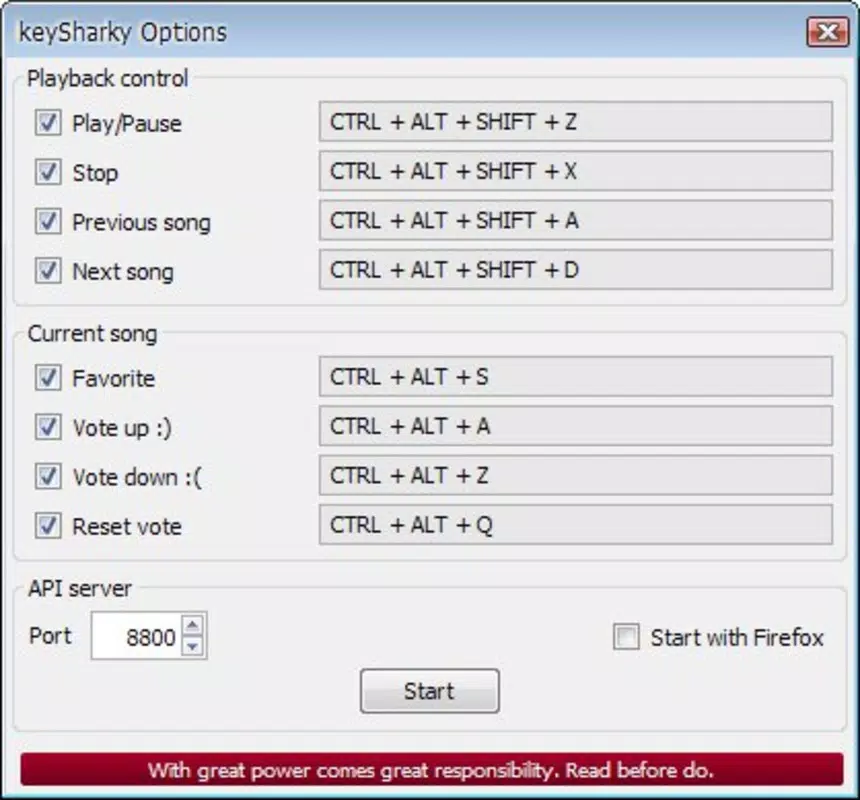
- Effortless Music Control: Users can initiate playback, pause, and resume tracks using dedicated keyboard shortcuts. This feature allows for immediate control without navigating away from current tasks, ideal for users who maintain multiple browser tabs.
- Next and Previous Track Navigation: With simple key commands, listeners can switch between songs seamlessly. This is particularly useful when skipping unwanted tracks or returning to a favorite song without interrupting workflow.
- Song Voting Integration: KeySharky enables users to upvote or downvote tracks directly from the keyboard. This interactive feature allows for quick feedback on music, enhancing user engagement with the Grooveshark platform.
- Low Resource Consumption: The add-on uses only 40.9 KB of storage, ensuring minimal impact on system performance. It operates efficiently in the background, making it suitable for devices with limited processing power or memory.
- Easy Installation: Installation requires just a few clicks through the Firefox Add-ons manager. Once enabled, the add-on is immediately functional, with no additional configuration needed.
For example, a user working on a document while streaming music can pause playback with a single keystroke, skip to the next track after a few seconds, and vote on a song—all without switching focus. This level of integration supports a fluid, uninterrupted experience, particularly valuable in productivity-oriented workflows.
Interface, UX & Performance
As a browser add-on, KeySharky does not feature a standalone user interface. Instead, it operates silently in the background, relying on keyboard inputs to trigger actions. The lack of visual elements ensures a clean, unobtrusive experience that does not clutter the browser window or distract from the main content.
Navigating through the add-on’s functionality is straightforward: users simply press predefined keys to control playback. The responsiveness is immediate, with actions executed as soon as the key combination is detected. Although the developer did not list formal performance metrics, the minimal file size and lightweight design suggest consistent performance across a range of devices.
Stability appears to be a strong point, as the add-on functions without requiring frequent updates or troubleshooting. Its design prioritizes reliability, making it dependable for daily use. Users can expect smooth operation even during extended listening sessions or when multiple tabs are open. The overall user experience is streamlined, focused on utility rather than aesthetics, which aligns with its productivity-driven purpose.
Platform Compatibility & Technical Requirements
KeySharky is designed exclusively for the Firefox browser. The developer did not specify minimum OS requirements or compatibility details beyond the platform. The current version is 1.0.3, and the file size is 40.9 KB, indicating a highly compact and efficient add-on.
Given its release date in 2010, the app was developed during a period when browser extensions were becoming mainstream, but standards were still evolving. While it functions on modern Firefox versions, compatibility may vary depending on updates to the browser’s extension architecture. Users are advised to ensure their Firefox installation is up to date to avoid potential conflicts.
Specific requirements were not listed. Therefore, compatibility with newer Firefox versions cannot be confirmed with certainty. However, the lightweight nature of the add-on increases the likelihood of continued functionality across various systems.
Pros and Cons
Pros
- Lightweight design with minimal resource usage (40.9 KB)
- Simple, intuitive keyboard shortcuts for music control
- Efficient navigation between tracks without mouse interaction
- Direct integration with Grooveshark for seamless voting and playback
- Quick and easy installation via Firefox Add-ons manager
Cons
- Exclusive to Firefox; not available on other browsers
- Platform-specific functionality tied to Grooveshark, which is no longer active
- Development ceased in 2010; no recent updates or support
- No visible interface or customization options
- Compatibility with modern Firefox versions is uncertain
FAQ
Is KeySharky safe to install?
Yes, KeySharky is a free add-on developed by Eddie C. Reardon and distributed through the official Firefox Add-ons platform. It does not contain malware or intrusive behavior.
Can I use KeySharky on mobile browsers?
KeySharky is designed exclusively for the Firefox desktop browser. It is not compatible with mobile platforms or mobile versions of Firefox.
Does KeySharky require internet access?
Yes, since KeySharky interacts with the Grooveshark platform, an active internet connection is required to stream music and use its features.
Is KeySharky still updated?
There are no recent updates to KeySharky. The last version was released in 2010, and the developer has not provided any new releases since then.
Can I customize the keyboard shortcuts?
The developer did not provide information on customization options. The default key bindings are likely fixed and not user-adjustable.
Final Thoughts
KeySharky stands as a niche yet effective tool for users who once relied on Grooveshark for music streaming. Its focus on keyboard-driven playback control, low resource usage, and seamless integration with the platform reflect a thoughtful approach to enhancing user efficiency. While the app is no longer actively maintained and Grooveshark is no longer operational, KeySharky remains a testament to early browser extension innovation.
For those still using legacy systems or accessing archived content through Firefox, the add-on may offer a functional experience. However, its relevance is limited to a specific historical context. For modern users seeking similar functionality, alternative tools with current support and broader compatibility are recommended.
Download KeySharky now


